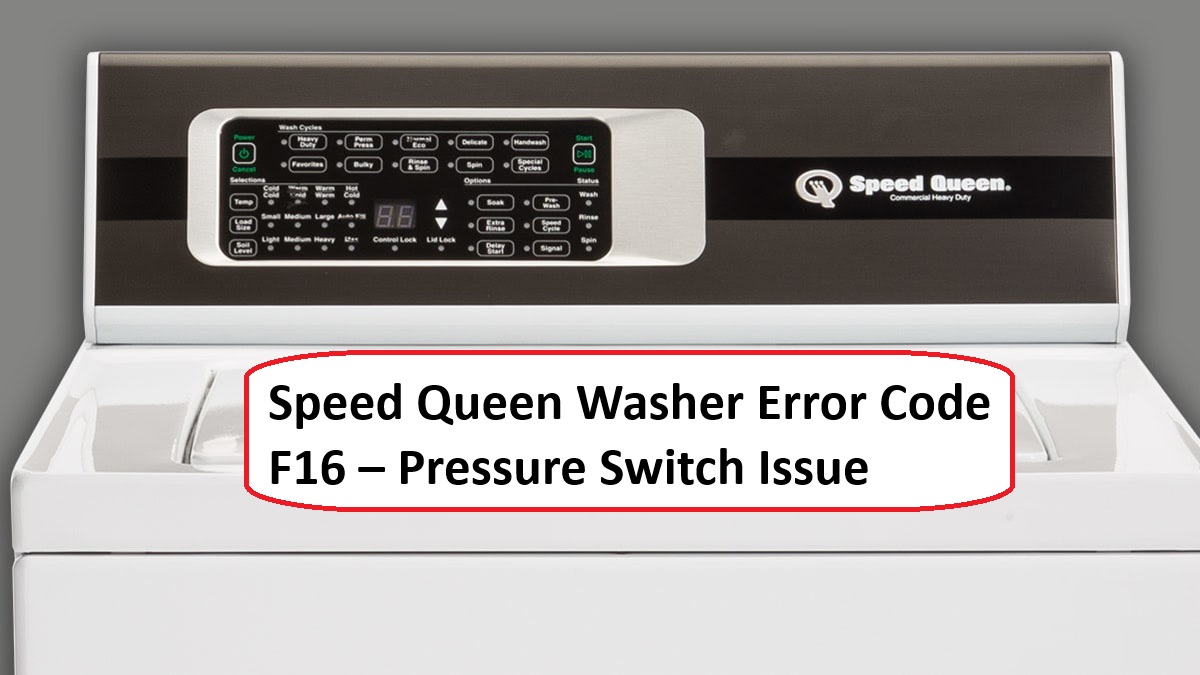
We understand how frustrating it can be when your Speed Queen washer displays the F16 error code. This code indicates a problem with the pressure switch, which is responsible for monitoring the water level in your washer.
Don’t worry—this is a common issue and often has simple DIY solutions.
One common cause of the F16 error is a clog in the water fill system, which can prevent the pressure switch from functioning properly.
To get a complete understanding of this error and discover more potential causes and troubleshooting steps, we encourage you to read through the entire post. By doing so, you’ll be better equipped to restore your washer’s functionality and get back to your laundry routine in no time!
What Does the Error Code Means?
When your Speed Queen washer shows the error code F16, it usually points to a problem with the water fill system. This code often relates to the pressure switch or the water inlet valve. To start troubleshooting, make sure that the water supply is turned on and check that the hoses are not kinked or clogged. If you find that the water flow is good, the next step is to inspect the pressure switch for any blockages or signs of damage.
Here are some common steps you can take to resolve this issue:
- Check Water Supply: Ensure that both hot and cold water supplies are fully turned on.
- Inspect Hoses: Look for any kinks or clogs in the hoses that could restrict water flow.
- Examine the Pressure Switch: This component detects the water level in the washer. Make sure it is clear of debris and functioning properly.
- Secure Electrical Connections: Ensure that all electrical connections related to the water fill system are tight and free from corrosion.
- Test the Water Inlet Valve: This valve controls the flow of water into the washer. If it’s malfunctioning, it may need to be replaced. Additionally, check for a malfunctioning door lock assembly as it can also prevent proper water filling.
Common Causes Behind Error Code
Common Issues Leading to F16 Error Code. A malfunctioning pressure switch can lead to incorrect water levels and hinder washer operation, similar to a water level sensor fault.
Faulty Pressure Switch Assembly
If your Speed Queen washer is displaying the F16 error code, it may be due to a faulty pressure switch assembly. This can certainly disrupt your laundry routine, but don’t worry—understanding the common issues associated with pressure switch types can help you troubleshoot effectively and safely.
Here are some common issues you might encounter with pressure switches, along with straightforward solutions:
| Common Issues | Solutions |
|---|---|
| Electrical Failure | Inspect and secure all electrical connections to ensure they are tight and free of corrosion. A loose connection can interrupt the pressure switch’s functionality. |
| Mechanical Failure | Carefully inspect the pressure switch for any visible damage or wear. If you notice any cracks or broken components, it may be time to replace the switch. |
| Calibration Issues | If the pressure switch is not functioning correctly due to calibration issues, you may need to recalibrate it. Refer to your washer’s manual for specific recalibration instructions. |
| Incompatible Parts | Always use OEM (Original Equipment Manufacturer) parts for replacements. Using compatible parts can lead to further issues down the line, so be sure to source the correct components. |
Additionally, it is essential to inspect wiring connections as faulty wiring can significantly impact the pressure switch’s performance.
Clogged Pressure Hose
A clogged pressure hose can be a common issue that leads to the F16 error code in your Speed Queen washer. This problem occurs because the obstruction interferes with the pressure switch’s ability to receive accurate signals regarding the water level, causing your washer to malfunction.
The most frequent culprits of clogs are lint buildup, soap residue, or even foreign objects that may have found their way into the hose. To prevent these issues from arising, it’s crucial to perform regular maintenance on your pressure hose. Make it a habit to periodically inspect and clean the hose to ensure it remains clear and functional.
When you’re testing the pressure switch, take a moment to check for any signs of blockage or leaks in the hose. If you notice a clog, it’s important to clear it carefully to restore the proper function of your washer. Additionally, ensuring that the washer is level to prevent errors can help avoid similar issues in the future. By being proactive about hose maintenance, you can save yourself time and frustration down the line, ensuring that your washer continues to operate smoothly and efficiently. Remember, a little attention to detail can go a long way in prolonging the life of your appliance!
Damaged Wiring Connections
When addressing the F16 error code on your Speed Queen washer, one of the key areas to focus on is the condition of the wiring connections. Over my 20 years in appliance repair, I’ve seen that faulty or loose connections can significantly disrupt communication between the various components, which can lead to issues such as pressure switch malfunctions.
Start your troubleshooting with a comprehensive inspection of the wiring. Look for any frayed wires, signs of corrosion, or disconnected plugs. Pay special attention to areas where wires may be in contact with sharp metal edges, as this can cause wear and lead to further problems over time.
If you identify any issues, it’s important to address them promptly. Repairing any damaged connections and ensuring that all plugs are securely fastened can often resolve the error code you’re experiencing. Remember, a tight and secure connection is crucial for your washer to function properly. Additionally, faulty wiring connections can also contribute to other error codes, so it’s vital to keep all components in good condition.
Should the error persist after you’ve made these checks, it may be time to delve deeper. In such cases, seeking professional assistance can be beneficial to ensure that your washer is operating as it should. Your safety and the proper functionality of your appliance are paramount, so don’t hesitate to reach out for expert help if needed.
Faulty Control Board Signal
When your Speed Queen washer shows the F16 error code, it often points to a problem with the control board signal. Think of the control board as the brain of your washer—it’s responsible for managing tasks like filling and draining water. If this control board is not functioning correctly, it may send inaccurate signals to the pressure switch, which can trigger the F16 error code. This code essentially means that your washer is having trouble detecting the water levels, which can interrupt the wash cycle.
To tackle this issue, start by carefully inspecting the control board. Look for any signs of visible damage, corrosion, or loose connections. These can be indicators that the control board is failing. If you notice any faults, replacing the control board might be necessary to restore proper function. Additionally, addressing wiring issues can help ensure clear communication between the control board and other components.
Regular maintenance is key in preventing such issues from cropping up in the future. Simple steps like cleaning the interior and checking connections can go a long way in keeping your washer running smoothly. Remember, when dealing with electrical components, always prioritize safety by disconnecting the power before you begin any inspection or repairs.
Required Tools to Fix the Error
Essential Tools for Troubleshooting
When addressing the F16 pressure switch issue, having the right tools is critical for effective troubleshooting and repair. Additionally, a multimeter can be invaluable for testing electrical connections to ensure components are functioning properly.
Basic Tools
Before addressing the Speed Queen washer error code F16, it’s important to gather some essential tools to ensure a smooth and safe troubleshooting process. Here’s what you’ll need:
- Multimeter: This is crucial for checking electrical connections and voltage levels. It will help you determine if there are any issues with the electrical components related to the washer’s operation.
- Screwdrivers: A flathead and Phillips screwdriver are necessary for accessing the internal components of your washer. Different screws may require different types of screwdrivers, so having both on hand is important.
- Pliers: These will assist you in disconnecting hoses safely. If you encounter any stubborn connections, pliers can provide the extra grip you need.
- Wrench: A wrench will be useful for loosening any fittings you come across during your repair process. Make sure to have the appropriate size for the fittings on your specific model.
- Towel: It’s wise to keep a towel nearby to catch any water spills that may occur while you’re working. This will help maintain a clean workspace and prevent slips.
In addition to these tools, familiarizing yourself with basic maintenance tips will not only enhance your efficiency but also help you understand how to prevent future issues. Employing common troubleshooting techniques will assist you in pinpointing the pressure switch problem that could be causing the F16 error, similar to how checking the drain filter for debris can resolve the F21 error in GE washers.
Supplies
Gathering the right supplies is crucial for effectively addressing the error code F16 in your Speed Queen washer. First, you’ll need a multimeter—a handy tool for testing the pressure switch to ensure it’s operating correctly. This step is essential, as a malfunctioning pressure switch is often the root of the problem.
Next, have a reliable screwdriver set ready. This will allow you to access the washer’s internal components safely and efficiently. Should your tests indicate that the pressure switch is indeed faulty, a replacement pressure switch will be necessary to restore your washer to proper working order.
It’s also wise to keep a bowl or towel nearby. When you open the washer, there may be residual water, and you’ll want to catch that to avoid any mess. Additionally, ensure you are prepared to troubleshoot any water level sensor fault that may arise during the repair process. Lastly, I recommend wearing gloves throughout this process. Not only do they protect your hands, but they also enhance your grip while working with small components.
Pre-Safety Checklist Before Fixing
Before you tackle the F16 error code on your Speed Queen washer, it’s essential to prioritize your safety. With over 20 years of experience in appliance repair, I’ve learned that following a thorough safety checklist can help you avoid potential hazards and ensure a smooth repair process. Here’s what you need to do before getting started:
- Unplug the Washer: Always disconnect the power supply to eliminate any risk of electrical shock. This is a crucial step that should never be overlooked.
- Turn Off the Water Supply: By shutting off the water supply, you can prevent any leaks or flooding that could occur while you’re working on the machine. This step not only protects your home but also makes your repair environment safer.
- Wear Protective Gloves: It’s wise to wear gloves to shield your hands from sharp edges and any chemicals that may be present. This simple precaution can prevent injuries and keep you safe while you work.
- Inspect the Area: Take a moment to look around the workspace for any potential hazards, such as clutter, slippery surfaces, or obstacles. A clean and organized area will reduce the risk of accidents and make your repair more efficient.
- Check for Electrical Issues: Ensure there are no power interruptions that could affect your washer’s operation, as this can lead to further complications during the repair process.
Diagnose the Error Code
To effectively diagnose the F16 error code on your Speed Queen washer, it’s essential to understand what this code indicates. The F16 code points to an issue with the pressure switch, which is crucial for accurate water level detection.
Here’s a step-by-step approach to tackle this problem:
- Check the Pressure Hose: Start by examining the pressure hose connected to the pressure switch. Look for any blockages, kinks, or signs of wear. A clogged or damaged hose can disrupt the pressure readings and lead to the F16 error.
- Inspect the Pressure Switch: Next, take a close look at the pressure switch itself. Check for any visible signs of damage or wear. Ensure that the switch is securely mounted and that all electrical connections are intact.
- Test the Pressure Switch: If the hose and connections seem fine, it’s time to test the pressure switch. Using a multimeter, you can measure the switch’s continuity. Make sure to disconnect power to the washer before performing this test for your safety.
- Clean the Hose Regularly: To prevent future issues, incorporate regular maintenance by cleaning the pressure hose periodically. This simple step can help avoid blockages and ensure accurate pressure readings.
Step-by-Step DIY Troubleshooting Guide
Moving On to the Next Steps in Troubleshooting
Replace Pressure Switch Assembly
Replacing the pressure switch assembly in your Speed Queen washer is a practical solution for resolving the F16 error code and restoring your washer’s functionality. Let’s walk through the process step by step to ensure a safe and effective repair.
1. Safety First: Begin by unplugging the washer to eliminate any risk of electric shock. Safety should always be your top priority when working on any appliance.
2. Locate the Pressure Switch: The pressure switch is typically situated at the back or side of the washer. You may need to remove a panel to access it, so keep your tools handy.
3. Identify the Right Pressure Switch: Different models may use various types of pressure switches. It’s essential to verify the specific type your model requires. Refer to your owner’s manual or the manufacturer’s website for guidance if you’re unsure.
4. Test the Pressure Switch: Before replacing it, conduct a pressure switch test. Check the electrical connections for any signs of wear or damage. Using a multimeter, verify continuity of the switch. If it does not show continuity, that indicates a failure.
5. Remove the Old Assembly: If the pressure switch is faulty, carefully disconnect the old assembly. Take note of how the connections are arranged for proper installation of the new switch.
6. Install the New Pressure Switch: Align the new pressure switch and connect it securely, ensuring that all electrical connections are tight. Double-check that everything is in place before reassembling any panels.
7. Reassemble and Test: Once you’ve reconnected the pressure switch, put any removed panels back in place. Plug the washer back into the outlet and run a test cycle. Make sure to monitor for the error code to ensure it has been cleared and that the washer operates as intended.
Clear the Pressure Hose
After addressing the pressure switch assembly, the next step in troubleshooting the F16 error code is to clear the pressure hose. Safety is paramount, so start by unplugging the washer to prevent any electrical hazards.
Next, locate the pressure hose connected to the pressure switch; this is typically a small rubber tube. Carefully detach the hose from the switch, taking care not to damage it. Inspect the hose for any clogs, kinks, or blockages. If you notice any debris, use a soft brush or some compressed air to clear it out. It’s also important to check for signs of wear, such as cracks or fraying, which could lead to future issues.
Once the hose is clean and in good condition, securely reattach it to the pressure switch. After everything is back in place, plug the washer back in and run a test cycle to see if the F16 error code has been resolved. Following these steps can help you effectively troubleshoot and fix the issue. Remember, taking your time and being thorough in each step can make all the difference in maintaining your washer’s performance.
Repair Damaged Wiring Connections
When tackling the F16 error code on your washer, repairing damaged wiring connections is essential for ensuring your appliance functions correctly. First and foremost, always prioritize safety by unplugging the washer from the power source.
Next, take a close look at the wiring harness. You’re looking for any signs of wear and tear, such as frayed wire insulation or loose connections. If you find any damaged areas, you’ll want to carefully strip away the compromised sections of wire. To reconnect them, use heat shrink tubing or electrical tape, as these options will provide better insulation and protection against future issues.
It’s important to ensure that all connections are tight and secure. This step is crucial for enhancing the stability of your electrical connections. After completing your repairs, double-check to make sure that no wires are pinched or exposed, as this could lead to further problems.
Once you’ve confirmed everything is in order, plug the washer back in and run a test cycle. This will help you verify that the F16 error code has cleared, indicating that your repairs were successful. Remember, taking the time to address wiring issues thoroughly will help extend the life of your washer and keep it running smoothly.
Control Board Replacement Steps
To effectively address the F16 error code, you’ll need to replace the control board, which is crucial for managing your washer’s functions. Safety is always the top priority, so begin by disconnecting the power supply to your washer. This is an essential step to prevent any electrical hazards.
Once the power is off, use a screwdriver to remove the back panel of your washer. Take your time to ensure you don’t strip any screws or damage the panel. With the back panel removed, locate the control board, which is typically mounted on the main chassis of the washer.
Carefully disconnect the wiring harness attached to the control board. It’s important to do this gently to avoid damaging the connectors. Next, unscrew the control board from its mount. Keep track of any screws and parts you remove, as you’ll need them for the installation of the new board.
Before you install the new control board, take a moment to inspect all connections for any signs of wear or damage. This step is crucial, as damaged wiring can lead to further issues down the line. Once you’ve ensured everything is in good condition, install the new control board by reversing the removal steps: screw it into place and reconnect the wiring harness securely.
After the new control board is installed, reconnect the power supply. To reset the error code, utilize the control panel’s reset function. This is typically done by pressing and holding a specific button or combination of buttons, so refer to your washer’s manual for precise instructions.
Finally, run a test cycle to confirm that the F16 error code has been resolved and that your washer is operating smoothly. If everything functions correctly, you can confidently close the back panel and enjoy your washer’s renewed performance. Remember, if you encounter any difficulties or have questions during this process, don’t hesitate to reach out to a professional for assistance.
Call a Professional If
If you’re facing the F16 error code on your Speed Queen washer and your troubleshooting efforts haven’t resolved the problem, it may be time to reach out to a professional technician. Knowing when to seek expert help is crucial, as it can save you both time and money while preventing additional damage to your appliance. Here’s a straightforward guide to help you determine when it’s best to consult a professional:
| Symptoms | DIY Attempts | Recommended Action |
|---|---|---|
| Persistent F16 error | Reset the washer | Call a technician |
| Inconsistent water levels | Clean the filter | Seek professional assistance |
| No response to controls | Replace parts | Consult an expert |
| Unusual noises | Check connections | Contact a pro |
| Water leakage | Inspect hoses | Hire a technician |