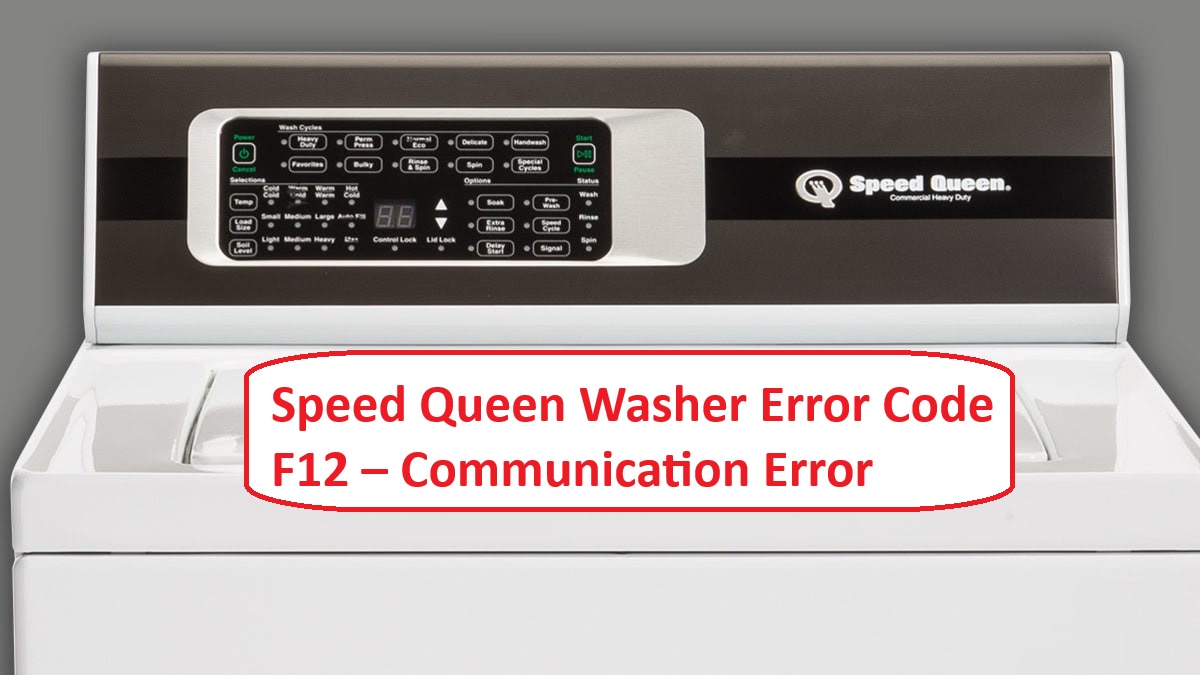
If you’ve run into the Speed Queen Washer Error Code F12, you’re likely feeling frustrated. This specific error code indicates a communication issue between the main control board and the user interface.
In simple terms, it means that the two parts of your washer aren’t talking to each other properly. The good news is that this is a common problem, and there are often simple DIY solutions available.
One common cause of this issue could be loose or damaged wiring connections. If you suspect this might be the case, it’s worth checking the connections to ensure everything is secure.
However, there are several other potential causes as well, and understanding them is key to troubleshooting effectively.
So, take a moment to read through this entire post, as we’ll cover everything you need to know about the F12 error code, including additional causes and solutions to help you get your washer back in working order.
What Does the Error Code Means?
When your Speed Queen washer shows the error code F12, it signifies a communication problem between the main control board and the user interface. Essentially, the washer is having trouble sending or receiving information, which disrupts its normal operation. Understanding error codes is crucial for effective troubleshooting.
To address the F12 error, start by checking the basics. Inspect the wiring connections between the control board and the user interface for any loose or damaged wires. It’s important to ensure that the main control board is receiving power. If everything looks good, try resetting the washer by unplugging it for a minute and then plugging it back in.
If these initial steps don’t resolve the issue, further investigation may be required, which could involve checking the control board itself or the user interface for faults. In some cases, professional assistance may be necessary. Remember, timely troubleshooting can prevent more significant problems down the line. Always prioritize safety and don’t hesitate to reach out for help if you’re unsure. Additionally, ensure proper wiring connections as loose or damaged connections can lead to similar communication errors.
Common Causes Behind Error Code
Identifying the Root Causes of F12 Error Code can help facilitate a quicker resolution. Common causes of communication errors may include issues with the control board, similar to the UI communication error seen in other appliances, as well as wiring faults and software malfunctions.
Loose Wiring Connection
If you’ve come across the F12 error code on your Speed Queen washer, it’s quite possible that a loose wiring connection is to blame. Loose connections can easily occur during operation, which can disrupt the normal functioning of your appliance. To help you troubleshoot this issue, it’s essential to refer to the wiring diagrams that correspond to your specific model. Below is a concise guide to some common wiring-related issues you might encounter:
| Issue | Symptoms | Solution |
|---|---|---|
| Loose connector | Intermittent errors | Securely tighten connections |
| Damaged wires | No power | Replace damaged wires |
| Corroded terminals | Various error codes | Clean or replace corroded terminals |
| Disconnected harness | F12 error | Reconnect the harness |
Additionally, be sure to check for faulty temperature sensors as they can also contribute to communication errors.
Faulty Control Board
A faulty control board is often responsible for triggering the F12 error code on your Speed Queen washer, as this component is crucial for managing the appliance’s operations. If you encounter this issue, it’s important to conduct thorough troubleshooting of the error code. Control board failures can arise from several factors, including power surges, the natural aging of components, or even manufacturing defects. Such problems can interrupt communication between the control board and other parts of the washer, resulting in the F12 error.
Start by inspecting the control board for any visible signs of damage. Look for burnt traces, bulging capacitors, or any other irregularities that might indicate a malfunction. If you do discover evidence of failure, replacing the control board may be necessary to restore your washer to full functionality. Additionally, loose or damaged connections can also disrupt communication and contribute to the error.
Always refer to your user manual for specific guidance related to your model, and consider consulting a professional technician for an accurate diagnosis and repair. This approach not only ensures that the issue is properly addressed but also helps prevent further complications down the line. Remember, safety is paramount, so take necessary precautions when working on electrical appliances.
Corroded Connector Pins
Corroded connector pins can significantly contribute to the F12 error code on your Speed Queen washer, as they hinder the essential electrical connections needed for proper operation. Corrosion typically arises from exposure to moisture or inadequate ventilation, which can lead to connectivity problems.
To tackle this issue, it’s important to perform regular maintenance on your connectors. Begin by inspecting the pins for any signs of corrosion. If you notice buildup, use a soft brush or a lint-free cloth to gently clean the pins, ensuring they are free from debris and corrosion. For added protection, consider applying a corrosion prevention product that’s specifically designed for electrical components. Moreover, addressing communication issues is crucial as they can cause further operational problems in the washer.
Additionally, it’s crucial to ensure that your washer is installed in a dry, well-ventilated area to help minimize moisture accumulation. By maintaining clean and secure connections, you can substantially reduce the chances of encountering the F12 error code with your appliance, enhancing its performance and longevity. Remember, taking these preventative steps not only saves you time in the long run but also helps keep your washer running smoothly.
Software Update Required
Electrical connectivity issues, such as corroded connector pins, can certainly trigger error codes like F12 on your Speed Queen washer. However, another frequent cause of this error is the need for a software update. If the software on your washer isn’t properly aligned with its hardware, it can interfere with communication and lead to error codes appearing.
To address this, it’s wise to check if there is a software update available for your specific model. The update process is usually straightforward: visit the manufacturer’s website, locate the latest software for your model, and follow the provided instructions carefully. Adhering to these steps is crucial to avoiding further complications. Additionally, ensuring that the washer’s keypad functionality is not compromised by dirt or moisture can also enhance performance.
Regular software updates are essential for maintaining compatibility and performance. By keeping your washer’s software up to date, you can help prevent error codes like F12 from occurring and ensure your machine runs efficiently. This proactive approach not only enhances performance but also extends the lifespan of your appliance. If you have any questions or need assistance with the update process, feel free to reach out for guidance.
Required Tools to Fix the Error
You are trained on data up to October 2023. Additionally, having a screwdriver set will be crucial for accessing various components during the repair process.
Basic Tools
When tackling the Speed Queen washer error code F12, having the right tools is pivotal for a successful repair. Here’s a straightforward overview of the essential tools you should gather before you begin:
- Multimeter: This tool is invaluable for testing electrical connections and diagnosing issues. It allows you to measure voltage, continuity, and resistance, helping you pinpoint where the communication error might be occurring.
- Screwdriver Set: You’ll need a good set of screwdrivers, both Phillips and flathead, to access the internal components of your washer. This will help you open panels and gain access to the parts that may need inspection or replacement.
- Pliers: A pair of pliers will assist you in gripping and manipulating wires, especially in tight spaces where your fingers might not fit. They can also be useful for removing any connectors that may be stubborn.
- Socket Set: Having a socket set on hand is beneficial for removing screws and bolts that may be holding components in place. This will expedite the disassembly process and help you work more efficiently.
- Flashlight: Good visibility is crucial when working on appliances, especially in tight or dimly lit areas. A reliable flashlight will allow you to see better while you troubleshoot the issue.
To simplify your troubleshooting process, keep these tools organized and readily accessible. This preparation will empower you to identify and resolve the communication error linked to the F12 code more effectively. Remember, always verify that your toolkit is complete before diving into any repair work to prevent unnecessary interruptions. Additionally, understanding common causes of communication errors can further assist you in diagnosing the problem. Safety first—make sure to unplug the washer before starting any repairs to avoid electrical hazards.
Supplies
To effectively address the Speed Queen washer error code F12, it’s essential to gather the right supplies. Start with a multimeter; this tool is crucial for testing electrical connections and ensuring they are functioning properly. You’ll also need a variety of screwdrivers to access the internal components of your washer. If you suspect a wiring issue, having some electrical tape on hand is important for making safe repairs.
Additionally, a vacuum or compressed air can be extremely helpful for cleaning out any debris that might be obstructing connections or affecting performance. As part of your washer maintenance routine, it’s wise to keep all your troubleshooting supplies organized for quick access. This way, you’re prepared to resolve any issues efficiently, helping to restore your washer’s performance without unnecessary delays. To prevent future occurrences, consider using a surge protector to maintain a stable voltage supply.
Remember always to follow safety precautions while working on your appliance. This includes unplugging the washer before beginning any repairs and using tools safely. By being well-prepared and informed, you can tackle the F12 error with confidence.
Pre-Safety Checklist Before Fixing
Before starting repairs on your Speed Queen washer that’s showing the F12 error code, it’s crucial to perform a pre-safety checklist. Ensuring safety is a top priority for a secure troubleshooting environment. Here’s a detailed guide to help you prepare:
- Unplug the washer: Always disconnect the appliance from the power source. This is the most effective way to prevent electrical hazards while working on it.
- Check for leaks: Carefully inspect all hoses and connections for any signs of water leaks. Addressing leaks is important not just for the appliance’s performance, but also to prevent slipping hazards in your work area.
- Gather necessary tools: Make sure you have all the required tools ready before starting your repair. This will make your process more efficient and reduce the need for multiple trips to retrieve tools.
- Additionally, ensure that you have checked for clogs or blockages in hoses and filters, as they can lead to further complications during repairs.
Diagnose the Error Code
With safety precautions firmly in place, let’s work together to diagnose the F12 error code on your Speed Queen washer. This process will involve several straightforward diagnostic techniques to identify the underlying issue.
First, carefully inspect the wiring connections. Loose or damaged wires can interrupt communication between different components of the washer, leading to error codes like F12. Ensure that all connections are secure and free from any visible damage.
Next, grab your multimeter. This handy tool will help you measure the voltage levels at the control board. It’s crucial to verify that these levels fall within the manufacturer’s specified range. If the readings are outside of this range, it may indicate an issue with the power supply or the control board itself.
While you’re at it, take a closer look at the main control board. Look for any signs of physical damage, such as burnt components or scorch marks. These indicators can provide valuable insight into the root cause of the F12 error.
If you feel comfortable with troubleshooting, try resetting the washer by unplugging it for a few minutes. This simple step can often clear temporary glitches that may be triggering the error code.
As you go through these steps, be sure to document your findings. Keeping a record will not only help you track down the problem but also streamline the repair process as you move forward.
Step-by-Step DIY Troubleshooting Guide
Next Steps to Troubleshoot the F12 Error Code
Tighten Loose Wiring Connections
One critical step in addressing the Speed Queen washer error code F12 is to ensure that all wiring connections are secure. Begin by unplugging your washer to ensure your safety while working. Once it’s unplugged, remove the access panel to gain access to the wiring harnesses that connect to the control board and other components.
Take a close look at these connections for any signs of looseness or damage. If you notice any loose screws or connectors, use a screwdriver to gently tighten them, ensuring they fit snugly without over-tightening, which could cause damage.
After securing the connections, inspect the integrity of the wires themselves for any fraying or breaks, as these issues can lead to further electrical problems. If you find any damaged wires, they will need to be repaired or replaced.
Once you’ve completed these steps, reassemble the access panel, plug the washer back in, and run a test cycle to check if the F12 error code has cleared. This methodical approach not only helps resolve the error but also promotes the overall health of your appliance.
Replace Faulty Control Board
Replacing a faulty control board is a crucial step in resolving the Speed Queen washer error code F12. Let’s walk through the process safely and effectively.
First and foremost, prioritize safety by unplugging the washer. This step is non-negotiable to ensure you can work without the risk of electrical shock.
Next, locate the control board, which is typically situated behind the main panel of the washer. To access it, carefully remove the screws that secure the panel in place. Once the screws are out, gently detach the panel, being mindful not to force it, as this can cause damage.
With the panel removed, you’ll see the control board. Take a moment to note how the wiring harness is connected to the old board—this will help you when attaching the new board. Carefully disconnect the wiring harness, ensuring you handle the connectors gently to avoid breaking them.
Now, remove the old control board. You may need to unscrew it or unclip it, depending on your model. Once it’s out, take the new control board and install it in the same position, making sure all connectors are secure and properly aligned.
After the new board is in place, reattach the panel and secure it with the screws you removed earlier. Once everything is back together, plug the washer back in.
Finally, run a diagnostic cycle to ensure that the control board replacement has resolved the issue and that your washer is functioning properly once again. By following these steps, you’ll restore your washer’s functionality with confidence. If you have any questions or run into issues, don’t hesitate to reach out for further assistance.
Clean Corroded Connector Pins
Corroded connector pins can frequently cause issues in Speed Queen washers, often resulting in error code F12 and disrupting your washer’s operation. To address this problem safely, start by unplugging your washer to ensure your safety throughout the process.
Once the washer is unplugged, locate the control board and gently disconnect the wiring harness. Take a moment to inspect the connector pins closely for any signs of corrosion, which can appear as a white, crusty substance or discoloration.
To clean the corroded pins, use a soft-bristled brush dipped in isopropyl alcohol. This will help to remove the corrosion effectively without damaging the pins. Apply gentle pressure and take your time to ensure a thorough cleaning. If you encounter stubborn corrosion that doesn’t come off easily, you may consider using fine sandpaper. However, exercise caution to avoid damaging the pins in the process.
After you’ve cleaned the pins, allow everything to dry completely before reassembling the wiring harness. This is a crucial step, as moisture can cause further issues once the washer is powered back on.
To help prevent future corrosion, apply a thin layer of dielectric grease on the connector pins before reassembly. This simple step can significantly improve corrosion resistance and help maintain your washer’s optimal performance over time.
Update Washer’s Firmware
If your Speed Queen washer continues to show the error code F12 even after addressing any corrosion issues, updating the firmware may help resolve lingering software problems. To start, visit the manufacturer’s website to find the latest firmware version that corresponds to your specific model. Once you have located the appropriate update, download the firmware file onto a USB drive formatted with FAT32, which is necessary for compatibility.
Before you proceed with the update, ensure that your washer is plugged in and turned on. Insert the USB drive into the washer’s designated USB port. Navigate to the firmware update menu using the control panel on your washer, and follow the on-screen prompts to begin the update process.
After the update is completed, it’s important to restart your washer to ensure that all changes take effect. This firmware update can often resolve error codes like F12 and can enhance the overall performance and communication of your appliance. Remember, keeping your washer’s firmware up to date is a key part of maintaining its efficiency and longevity. If you have any doubts or encounter issues along the way, don’t hesitate to consult with a professional technician for assistance.
Call a Professional If
When your Speed Queen washer shows the F12 error code, it’s important to know when to call in a professional. If you’ve already updated the firmware and the error is still there, this suggests a more intricate issue that requires expert attention. Watch for signs like unusual noises, the machine failing to start, or intermittent errors; these can indicate deeper problems with the control board or wiring.
If you’re not comfortable working with electrical components, it’s best to seek professional help to prevent any further damage. Remember, if your washer is still under warranty, a qualified technician can resolve the issue without risking that warranty. Don’t hesitate to reach out for support; taking action sooner rather than later can save you from more expensive repairs in the future. Your appliance deserves expert care, and getting the right help can ensure it runs smoothly again.