Dealing with a washing machine that won’t fill with hot water can be incredibly frustrating, especially when you’re trying to get your laundry done.
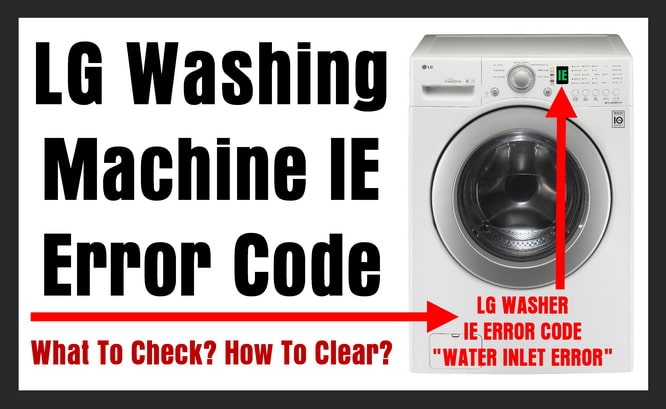
If your LG washer is displaying the IE3 error code, it indicates a fault with the hot water valve. In simpler terms, this means your machine is having trouble getting hot water, which can throw a wrench in your laundry schedule.
Don’t worry—this is a common issue, and many times the causes are simple enough for you to tackle yourself.
One frequent culprit behind the IE3 error is a clogged hose, which can prevent water from flowing properly.
If you’re curious to find out more about this error, including additional causes and solutions, be sure to read through the entire post.
We’ve got you covered with everything you need to know to get your washer back on track!
What Does the Error Code Means?
When you encounter the LG washer error code IE3, it signals a water drainage issue within your appliance. This error typically appears when the washer is unable to fill properly with hot water. Essentially, the machine is detecting a problem with either the water inlet valve or the water supply, which prevents it from reaching the necessary water level during the wash cycle.
Common causes of the IE3 error include clogged hoses, insufficient water pressure, or malfunctioning valves. To address this issue, start by checking the hot water supply to ensure it’s flowing correctly. Next, inspect the hoses for any blockages or kinks that could be impeding water flow. It’s also wise to verify that the water pressure in your home meets the washer’s requirements. Additionally, checking water supply lines for kinks or blockages can help prevent similar errors in the future.
Common Causes Behind Error Code
Identifying the Causes of IE3 Error Code
Error code IE3 may indicate issues similar to those seen with the F2 E3 error, which can be attributed to a malfunctioning pressure switch that affects the washer’s ability to fill properly.
Clogged Hot Water Line
A clogged hot water line can often lead to the LG washer error code IE3, a frustrating issue many homeowners face. Over time, sediment, mineral deposits, or other debris can accumulate in your hot water line, obstructing the flow of water. This obstruction can prevent your washer from filling properly, and in some cases, it may even halt operations altogether, resulting in that pesky error code.
To ensure your washing machine runs at its best, it’s essential to perform regular maintenance on your hot water line. Start by flushing the line to remove any buildup, and take the time to inspect for any leaks or blockages that may be hindering performance. Additionally, check the water supply valves to ensure they are fully open; sometimes, a simple adjustment can resolve the issue. Furthermore, insufficient water pressure can also contribute to filling problems, so it’s wise to monitor the pressure levels as well.
If you suspect that a clog is the problem, addressing it promptly is crucial. Ignoring this issue can lead to more significant complications down the road, affecting the efficiency of your washing machine and potentially leading to costly repairs. By staying proactive with your appliance care, you can maintain optimal performance and extend the life of your washer. Remember, a little attention goes a long way in keeping your appliances running smoothly.
Faulty Hot Water Valve
Clogged hot water lines are often behind the LG washer error code IE3. However, a faulty hot water valve can also be a significant contributor to this issue. When the valve fails to open or close properly, it disrupts the flow of water, leading to the error. To prevent this from happening, regular maintenance of the valve is crucial. Additionally, inspecting for malfunctioning water inlet valves can help identify other potential issues affecting water flow.
Here’s a breakdown of possible issues related to the hot water valve, along with their symptoms and solutions:
| Possible Issue | Symptoms | Solution |
|---|---|---|
| Clogged Valve | No hot water flow | Clean or replace the valve |
| Electrical Failure | Valve doesn’t respond | Inspect wiring and connections |
| Mechanical Wear | Inconsistent water supply | Replace the valve |
| Corrosion | Leaks or blockages | Inspect and replace as needed |
Defective Wiring Connection
Defective wiring connections can often trigger the LG washer error code IE3, which interrupts the hot water supply. This issue usually arises from loose or corroded terminals, damaged wires, or improper installation. When the wiring is not secure, the washer has difficulty communicating with the hot water valve, leading to this frustrating error code.
To tackle this problem, start by carefully inspecting the wiring harness for any visible signs of damage or disconnections. Look for loose connections, frayed wires, or corrosion on the terminals. It’s essential to ensure that all connections are tight and clean, as even a small amount of corrosion can disrupt the flow of electricity. Additionally, regular maintenance can help prevent these connection problems in the future, allowing your washer to operate smoothly and efficiently. Remember, safety is paramount, so always unplug the washer before performing any inspections or repairs. By taking these proactive steps, you can keep your appliance running at its best.
Faulty Water Supply Pressure
If you’re encountering the LG washer error code IE3, it’s likely due to inadequate water supply pressure. This issue can stem from several factors, which impede the washer’s ability to fill correctly. To ensure your LG washer operates efficiently, it’s crucial to verify that the water supply meets the necessary pressure specifications. Additionally, ensure that the external power supply is stable, as fluctuations can also interfere with washer performance.
Here’s a breakdown of common causes and their respective solutions:
| Common Causes | Solutions |
|---|---|
| Clogged hoses | Inspect the hoses for blockages and clean them thoroughly. |
| Closed shut-off valves | Make sure all shut-off valves are fully open. |
| Kinked hoses | Check for any kinks in the hoses; straighten or replace them if needed. |
| Low municipal pressure | Reach out to your water provider to address any supply issues. |
Required Tools to Fix the Error
Essential Tools for Troubleshooting
When fixing the error, use the necessary tools to ensure a thorough inspection of components such as the water inlet valve issues.
Basic Tools
When addressing the LG Washer Error Code IE3, having the right tools on hand is crucial for both effective diagnosis and resolution of the problem. Here’s a list of essential tools you should gather before you begin:
- Multimeter: This device is key for checking the electrical components within your washer. Use it to measure voltage and continuity, which will help you determine if the hot water valve and other components are functioning correctly.
- Screwdriver Set: A good set of screwdrivers is necessary for accessing the various panels and internal components of your washer. Make sure you have both Phillips and flathead screwdrivers in your toolkit.
- Pliers: These are useful for disconnecting hoses and fittings without causing damage. They can give you the leverage you need to safely remove parts that may be stuck or tightly fitted.
- Towel: Keep a towel handy to manage any water spills that may occur during your repair process. This will help you maintain a clean workspace and prevent slips.
- Safety Gear: Always prioritize safety. Wear gloves to protect your hands from sharp edges and electrical components, and goggles to shield your eyes from debris that might pop up during repairs. Additionally, it’s important to check for blockages in hoses that might affect water flow while troubleshooting.
Supplies
To effectively address the LG Washer Error Code IE3, it’s essential to gather the right supplies. Here’s a straightforward list to help you prepare for the task ahead:
- Multimeter: This tool is crucial for electrical testing. You’ll use it to measure voltage and check for continuity in the water valve, ensuring that it’s functioning correctly.
- Screwdriver Set: Having a comprehensive screwdriver set will make it easier to access the internal components of your washer. Different screw types may be involved, so having the right tools on hand is key.
- Replacement Parts: If your diagnosis reveals a faulty hot water valve, it’s wise to have a new one ready. This will save you time during the repair and ensure that your washer gets back to working condition promptly.
- Towels: Keep some towels nearby to catch any water spills that may occur during the repair process. This will help you maintain a clean workspace and avoid any mess.
- Adjustable Pliers: These are useful for dealing with any water supply lines that may need adjustments. They will help you securely grip and twist any fittings without damaging them.
- Bucket: If you need to drain excess water, a bucket will come in handy. It will help contain any spills, making the process smoother.
Additionally, ensure that you have the proper tools to inspect the wiring connections for any damage, as this can impact the performance of your washer.
Pre-Safety Checklist Before Fixing
Before starting any repair work on your washer, it is crucial to prioritize safety to prevent accidents and further complications. To ensure your workspace is secure, follow this essential pre-safety checklist:
- Unplug the Washer: Always disconnect the power supply by unplugging the appliance from the wall outlet. This step is vital to protect yourself from electric shock while you conduct your repairs.
- Turn Off Water Supply: Locate and shut off the hot and cold water valves connected to your washer. This will prevent any leaks or flooding that could occur during the repair process.
- Check for Leaks: Before you begin, thoroughly inspect the hoses and connections for any signs of water leakage. Identifying and addressing any leaks will help you avoid hazardous conditions while you work. It is also essential to check wiring connections for damage to ensure safe operation after repairs are made.
Diagnose the Error Code
To effectively diagnose the IE3 error code on your LG washer, it’s essential to understand that this code typically points to a water supply issue. Let’s walk through some straightforward troubleshooting steps to help you address the problem.
- Check Your Water Source: Start by ensuring that your hot water supply valve is fully open. Sometimes, valves can be partially closed, which can restrict water flow.
- Inspect the Hose: Look at the hose connected to the washer. Ensure there are no kinks or clogs that could impede water from reaching the machine.
- Examine the Inlet Filter: Next, take a look at the inlet filter on the washer. This filter can accumulate debris over time, which may block water flow. If it looks dirty, carefully clean it to ensure it’s clear.
- Test the Hot Water Valve: If everything appears to be in order so far, you’ll want to check the hot water valve itself. Using a multimeter, you can test it for continuity. If the valve is malfunctioning, it could be the culprit behind the IE3 error code.
Step-by-Step DIY Troubleshooting Guide
Transitioning to the Next Steps in Troubleshooting
Clear the Water Line
If your LG washer is showing the IE3 error code, it’s essential to clear the water line to restore its proper function. Here’s a step-by-step guide to help you through the process safely and effectively.
1. Disconnect Power****
- Action: Start by unplugging the washer from the electrical outlet.
- Notes: Ensuring safety is the first priority; this prevents any risk of electrical shock while you work on the appliance.
2. Turn Off Hot Water Supply****
- Action: Locate the valve for the hot water supply line and turn it off.
- Notes: This step is crucial to prevent any leaks or water spillage during the inspection process.
3. Inspect and Clean the Hose****
- Action: Remove the hot water supply hose from the back of the washer. Carefully inspect it for any kinks or blockages that may impede water flow.
- Notes: Use a bucket to flush out any debris from the hose. This will ensure that water can flow freely when the washer is back in operation.
4. Reconnect the Hose****
- Action: Securely reconnect the hot water supply hose to the washer.
- Notes: Make sure it is tightened properly to prevent any leaks.
5. Test for Leaks****
- Action: Turn the hot water supply valve back on and check for any leaks around the connections.
- Notes: This final step is important to ensure that everything is functioning correctly and safely.
Replace Hot Water Valve
Replacing the hot water valve in your LG washer is a crucial task, especially when you’re encountering the IE3 error code. This error typically indicates issues with water flow, which can often stem from a faulty valve. Let’s walk through the steps you need to take to safely and effectively replace the hot water valve.
Step 1: Safety First
Begin by unplugging the washer from the electrical outlet. This is vital to ensure your safety while working on the appliance. Next, turn off the water supply to the washer to prevent any leaks during the process.
Step 2: Access the Hot Water Valve
To reach the hot water valve, you’ll need to remove the back panel of the washer. This typically involves unscrewing several screws—keep these in a safe place so you can easily reassemble everything later.
Step 3: Disconnect the Old Valve
Once the back panel is off, locate the hot water valve. Carefully disconnect the wiring harness attached to the valve. Take note of how it is connected, as you’ll need to replicate this with the new valve. Next, unscrew the valve from its mounting bracket and gently remove it from the washer.
Step 4: Install the New Valve****
Now it’s time to install the new hot water valve. Secure it in place by screwing it back into the mounting bracket. Make sure the connection is tight to prevent any leaks. After that, reconnect the wiring harness, ensuring that it is properly seated.
Step 5: Reassemble and Test
Before putting the back panel back on, double-check that the hot water supply line is securely attached to the new valve. Once you’re confident everything is connected correctly, replace the back panel and secure it with the screws you set aside earlier.
Turn the water supply back on, plug the washer back in, and run a test cycle. This will help you verify that the new valve is functioning correctly and that the IE3 error code has been resolved.
Repair Wiring Connections
After you’ve taken care of the hot water valve, the next step is to examine the wiring connections, as loose or damaged wires can indeed trigger the IE3 error code. Begin by ensuring your safety: unplug the washer before you start any inspection.
Take a close look at the wiring insulation for any signs of wear, such as fraying or cracking. If you find any exposed wires, it’s crucial to replace them immediately to avoid potential hazards. Next, check that all connections are tightly secured. Loose wires not only affect performance but can also create safety risks.
Using a multimeter, test for continuity in each wire. This will help you confirm that there are no breaks in the wiring that could lead to the error code. Once you’ve made any necessary repairs, be sure to reassemble everything carefully. Plug the washer back in and run a test cycle to determine if the error code has been resolved. This step is vital to ensure that your troubleshooting efforts were successful. Remember, taking the time to check these connections can save you from further issues down the line.
Check Water Supply Pressure
Checking the water supply pressure is a crucial step in resolving the LG washer’s IE3 error code. This error often indicates that there’s a problem with the water supply to your machine. To start, make sure the hot water supply valve is fully open. This ensures that your washer is receiving the maximum water flow it needs.
Next, you’ll want to measure the water pressure at the faucet using a pressure gauge. The ideal water pressure for your washing machine is between 20 and 120 psi. If the pressure is below this range, it can lead to supply issues and may prevent your washer from filling properly.
Take a moment to inspect the hoses connected to your washer. Look for any kinks, bends, or blockages that could impede water flow. Also, check the inlet filters on the water valves; these can become clogged with debris over time and restrict water supply. Cleaning these filters can often resolve low water pressure issues.
If you’ve confirmed that the hoses and filters are in good shape but the water pressure remains low, it’s wise to contact a licensed plumber. They can perform a more thorough investigation to identify any underlying issues with your home’s plumbing system.
Call a Professional If
If you’ve tried troubleshooting the IE3 error code on your LG washer and haven’t had any success, it might be the right time to reach out to a professional. Knowing when to seek help is crucial, especially if you’re noticing signs of malfunction that go beyond simple fixes.
Start with the basics: ensure that the water supply, valves, and hoses are all functioning properly. If the error continues after you’ve checked these components, it may be a signal that there’s a deeper issue at play. Pay attention to unusual noises, instances of continuous water filling, or problems filling with hot water—these can all be red flags indicating that your washer needs expert attention.
If you’ve attempted some repairs and the problems persist, don’t hesitate to call a technician. They have the training and experience to accurately diagnose and resolve the underlying issues that may be affecting your washer’s performance. Remember, attempting to fix complex problems without the right knowledge can lead to further damage. By seeking professional help, you ensure that your washer will operate efficiently and safely, giving you peace of mind in your laundry routine.