If your Amana washer is displaying the error code FdC, we understand how frustrating that can be. This specific error indicates a motor control fault, which means there might be a hiccup in communication between the control board and the motor.
You’re not alone—this is a common issue that many people encounter, and the good news is that there are often simple DIY solutions.
One common cause of the FdC error is a loose or damaged connection between the control board and the motor. If this is the case, it might be something you can fix yourself with a little troubleshooting.
To get a comprehensive understanding of this error, including more potential causes and solutions, we encourage you to read through the entire post.
By doing so, you’ll be better equipped to tackle the issue and get your laundry back on track!
What Does the Error Code Means?
What does the Amana washer error code FdC mean? This code indicates a motor control fault, which suggests that the control board is having trouble communicating with the motor. When you encounter the FdC error, it can result in the washer failing to start or abruptly stopping during a cycle.
To troubleshoot this issue effectively, start by unplugging the washer for a few minutes. This action can help reset the control board. If the FdC error persists after plugging it back in, your next step should be to examine the wiring connections between the control board and the motor. Look for any signs of damage or loose connections that could disrupt communication.
Additionally, it may be beneficial to test the motor itself to ensure it is functioning properly. Understanding the significance of the FdC error code and following these troubleshooting steps can help you resolve the issue safely and efficiently. Remember, if you’re uncomfortable performing these checks yourself, it’s always best to consult with a professional technician. Your safety and the proper functioning of your appliance should always come first. Furthermore, if you notice unusual noises during operation, this could indicate a deeper issue requiring immediate attention.
Common Causes Behind Error Code
Identifying the FdC Error Code Causes
Error code FdC indicates a motor control fault, which can stem from various issues within the washer’s system. Additionally, door lock assembly issues may also contribute to similar error codes, reflecting the importance of thorough inspection during troubleshooting.
Faulty Motor Connection
A faulty motor connection is one of the most common culprits behind the Amana washer error code FdC. If you’re facing this issue, it’s essential to take a systematic approach to troubleshoot. Start by unplugging your washer for safety. Then, check for any loose or damaged wires that connect the motor to the control board. These motor connection issues can disrupt communication between components, leading to improper washer operation.
Carefully inspect all the wires for signs of wear, fraying, or disconnection. Make sure that the connectors are securely attached and free from any corrosion. If you notice any damage during your inspection, it may be necessary to replace the affected components to restore functionality. Additionally, regular inspections of the drive belt can help prevent issues that may arise from other components connected to the motor.
Worn-Out Motor Brushes
One of the most common reasons for the Amana washer displaying the error code FdC is worn-out motor brushes. These brushes are crucial components of the motor, as they provide the necessary electrical contact for proper operation. Over time, due to the constant friction they endure, motor brushes can wear down, which can lead to performance issues with your washer.
To help prevent problems related to worn-out brushes, it’s important to incorporate regular maintenance into your routine. This includes inspecting the brushes regularly and replacing them when they show signs of wear. If you do encounter the FdC error code, there are some straightforward troubleshooting steps you can take. First, check the length of the motor brushes; they should be long enough to maintain good contact with the commutator. Make sure they are making proper contact, as insufficient contact can cause the motor to underperform. Additionally, communication issues can arise if the motor brushes are not functioning properly, leading to further complications.
Damaged Motor Control Board
If you’re seeing the FdC error code on your Amana washer, it could indicate that the motor control board is damaged. This critical circuit board plays a vital role in managing the motor’s functions, and when it malfunctions, communication between the control panel and the motor can be disrupted, resulting in operational issues.
There are a few common reasons why the motor control board may become damaged. Power surges, exposure to moisture, and manufacturing defects are among the leading causes. If you suspect that the motor control board is the issue, take a moment to inspect it for any visible signs of wear. Look for burnt components, corrosion, or any other anomalies that could indicate failure. Additionally, a malfunctioning motor can lead to complications that may exacerbate the error code.
Replacing the motor control board could potentially resolve the FdC error and restore your washer’s functionality. However, it’s crucial to approach this process with caution. Always follow proper safety protocols when working with electrical components. If you’re unsure or uncomfortable with the repair, it may be best to consult a professional technician who can accurately diagnose and fix the issue. Your safety and the proper functioning of your washer are the top priorities.
Faulty Wiring Connections
After inspecting the motor control board, one possible cause of the FdC error code may be faulty wiring connections. It’s crucial to closely examine the wiring harnesses and connectors for any signs of damage, such as fraying or corrosion. Utilize wiring diagrams specific to your appliance model to ensure that each connection is made according to the manufacturer’s specifications.
Connection stability is vital; any loose or damaged wires can disrupt communication between the control board and the motor, leading to errors. Make sure all connections are tight and secure. If you notice any connectors that appear compromised, consider re-crimping them or replacing them altogether.
In some cases, issues may be hidden within the wiring paths. If you’re comfortable doing so, trace these paths to detect any underlying problems that could affect performance. By addressing these faulty connections, you can effectively resolve the FdC error code and restore your Amana washer’s functionality. Always prioritize safety throughout this process, and don’t hesitate to reach out for professional help if you’re unsure. Additionally, ensure you inspect for damaged wiring that may contribute to communication breakdowns between the control board and motor.
Required Tools to Fix the Error
Essential Tools for Repairing Amana Washer Error Code FdC
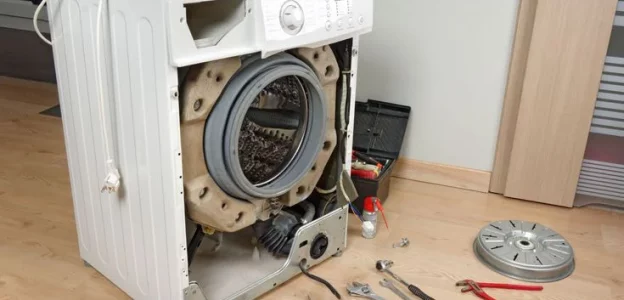
To effectively address the error, having the right tools is crucial for diagnosing and fixing the issues at hand. Additionally, a multimeter for testing electrical signals is essential to ensure proper functionality of the motor control system.
Basic Tools
When addressing the Amana washer error code FdC, having the right tools ready is crucial for an effective repair. With over 20 years of experience in appliance repair, I can assure you that being well-prepared will help you tackle the motor control fault confidently. Here’s a straightforward list of essential tools you should have:
- Screwdriver set: A variety of screwdrivers, including both flathead and Phillips, will allow you to access the internal components of your washer with ease.
- Multimeter: This tool is indispensable for diagnosing electrical issues. It helps you check voltage, continuity, and resistance, ensuring that all connections are functioning properly.
- Pliers: A good pair of pliers will be invaluable for gripping and manipulating wires or components during the repair process. They can also help you remove stubborn fasteners. Additionally, ensure you are aware of safety considerations when handling electrical components to prevent accidents.
Supplies
Gathering the right supplies is essential for effectively addressing the FdC error code in your Amana washer. Having the necessary tools at your disposal will simplify the repair process and enhance your troubleshooting capabilities. Here’s a detailed list of supplies you’ll need:
- Multimeter: This tool is vital for testing electrical components, allowing you to diagnose issues with accuracy. It helps you check for continuity and measure voltage, ensuring that your appliance’s electrical system is functioning properly.
- Screwdrivers: A set of both Phillips and flathead screwdrivers is key for removing access panels and reaching internal parts of your washer. Make sure to have various sizes to handle different screws you might encounter.
- Replacement parts: Depending on your diagnosis, you may need to procure specific components such as a motor control board or wiring harness. It’s wise to consult your washer’s manual or a trusted source to identify the exact parts required for your model. Additionally, ensuring secure connections at the outlet can help prevent related issues from arising during repairs.
Pre-Safety Checklist Before Fixing
Before you dive into fixing your Amana washer that’s showing the FdC error code, it’s crucial to prioritize safety to protect yourself and the appliance. Here’s a comprehensive checklist to ensure you’re prepared:
- Unplug the Washer: Always disconnect the washer from the power source. This step is essential to eliminate any risk of electric shock while you work on the appliance.
- Wear Insulated Gloves: Protect yourself by wearing insulated gloves. This will help guard against any unexpected electrical currents that might be present.
- Check the Work Area: Ensure that the area around your washer is dry and free of any liquids. This precaution minimizes the risk of slips and reduces the chance of creating electrical shorts.
- Use a Voltage Tester: Before you start working on the washer, utilize a voltage tester to confirm that there is no electrical current flowing to the appliance. This extra step adds an additional layer of safety.
- Have a Fire Extinguisher Nearby: It’s a good idea to keep a fire extinguisher rated for electrical fires within reach. While it’s a rare occurrence, being prepared is always wise. Additionally, ensure that you are aware of surge protectors as they can help maintain a stable voltage supply to the washer.
Diagnose the Error Code
Diagnosing the FdC error code on your Amana washer can seem daunting, but with a methodical approach, you can uncover the issue effectively. Let’s break it down step by step.
- Observe the Motor Performance: Start by paying close attention to how the motor operates during the wash cycle. If it appears sluggish or is unresponsive, this could be a sign of a potential fault.
- Check Wiring Connections: A common cause of motor issues is a faulty wiring harness. Carefully inspect the wiring for any loose connections or visible damage. Make sure to disconnect power before doing this to ensure your safety.
- Inspect the Motor Control Board: The motor control board is critical for proper operation. Look for any signs of burnt components or corrosion that could indicate a malfunction. If you spot any issues, this component may need to be replaced.
- Examine the Washer Drum: Ensure that the drum spins freely. Any obstructions, such as clothing caught in the components, can hinder motor performance. A free-spinning drum is essential for the washer to function correctly.
- Verify Power Supply: A stable power supply is crucial. Confirm that the washer is receiving the proper voltage and check for any tripped circuit breakers. If the power supply is inconsistent, it could lead to motor issues.
Step-by-Step DIY Troubleshooting Guide
Transitioning to Troubleshooting Steps
Inspect Motor Wiring Connections
Inspecting the motor wiring connections is a crucial step when addressing the Amana washer error code FdC. To ensure your safety, start by unplugging the washer from the electrical outlet. After that, carefully remove the access panel to reveal the motor and its wiring.
As you examine the motor wiring, look for any signs of damage, such as frayed or burnt wires. It’s important to check that all connections are tight; loose connections can lead to control faults in the motor, causing the error code to appear. If you notice any corrosion on the terminals, gently clean it using a wire brush or contact cleaner to ensure a good electrical connection.
Once you’ve completed the inspection and made any necessary repairs, reassemble the access panel and plug the washer back in. Run a test cycle to determine if the error code persists. If it does, it may indicate the need for further diagnostics to identify the underlying issue.
Replace Motor Brushes
Replacing the motor brushes in your Amana washer is a manageable task that can effectively address the issues related to error code FdC. To ensure your safety, start by unplugging the washer from the power source.
Once that’s done, you’ll need to remove the back panel to gain access to the motor. Take a moment to inspect the motor brushes for any signs of wear. Worn brushes can lead to poor motor performance, so if they appear damaged or excessively worn down, it’s time for a replacement.
Carefully disconnect the old brushes. Note how they are positioned, as this will guide you in installing the new ones properly. When installing the new brushes, make sure they fit securely in place to avoid any operational issues.
After replacing the brushes, reassemble the back panel and plug the washer back in. To ensure everything is functioning correctly, run a test cycle. This will confirm that the issue has been resolved and that your washer is back in excellent working condition.
Replace Damaged Control Board
If your Amana washer is showing the error code FdC even after you’ve replaced the motor brushes, it may be time to consider replacing the damaged control board. Here’s a straightforward guide to help you navigate the control board replacement process safely and effectively:
| Step | Action | Tools Needed |
|---|---|---|
| 1 | Unplug the washer | Screwdriver |
| 2 | Remove the back panel | Multimeter |
| 3 | Disconnect the wire connectors | Replacement control board |
| 4 | Install the new control board | |
| 5 | Reassemble the washer and test it |
Safety First: Always ensure the washer is unplugged before you begin to prevent any risk of electric shock. Handle all components with care to avoid any accidental damage.
Once you’ve installed the new control board, plug in the washer and monitor it for the error code. If the code is cleared, your washer should be back to functioning normally. Should the issue persist, consider consulting a professional for further diagnosis. Remember, thorough troubleshooting can save you time and money in the long run.
Repair Faulty Wiring Connections
After you’ve tackled the control board issue, it’s important to consider that faulty wiring connections could still be causing the persistent FdC error code on your Amana washer. Let’s go through this step-by-step to ensure safety and effectiveness.
First, unplug the washer to eliminate any risk of electrical shock. Once it’s unplugged, carefully inspect all visible wiring for any signs of damaged insulation. Look for exposed wires, as these can create shorts and lead to further issues. If you encounter any damaged sections, replace them with new, properly insulated wire to ensure safety and reliability.
Next, focus on the connections at the motor control unit. It’s essential that these connections are tight and secure, as loose connections can interrupt the flow of electricity and trigger error codes. A handy tool for this task is a multimeter. Use it to test for continuity in each wire; this will help you identify any breaks in the circuit that could be causing problems.
If you find any loose connections, stabilize them using electrical tape or heat shrink tubing. This will provide additional insulation and ensure a secure connection.
Once you’ve made all necessary repairs, carefully reassemble the washer. Plug it back in and run a test cycle to check if the error code has been resolved. If everything is working smoothly, you’ve successfully addressed the wiring issues!
Call a Professional If
When your Amana washer is giving you trouble, it’s important to know when to call in a professional technician. If you notice persistent issues, such as frequent error codes, unusual noises, or the machine just won’t start, these can be signs of more complex problems that require expert attention. A trained technician can provide an accurate diagnosis and effective repairs, helping to prevent further damage to your washer.
Here’s a quick reference for common symptoms and the recommended actions:
| Common Symptoms | Action to Take |
|---|---|
| Frequent error codes | Call a professional |
| Unusual noises | Schedule a service |
| Failure to start | Request an inspection |
Attempting to fix these issues on your own can not only void your warranty but could also lead to more significant problems down the road. By trusting a professional, you can save both time and money, ensuring your washer operates efficiently and reliably. Remember, it’s always better to seek help than to risk making the situation worse.