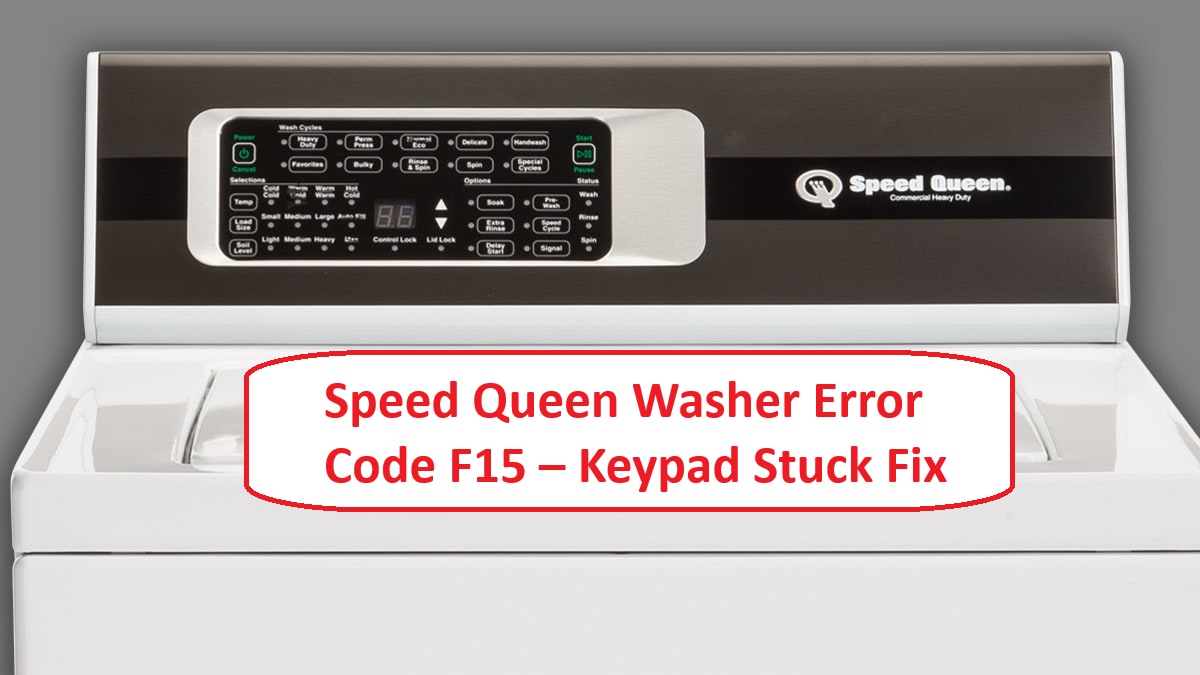
If you’ve ever found yourself frustrated with your Speed Queen washer, you’re not alone. Many users encounter the F15 error code, which often indicates that the keypad may be stuck or not responding properly.
In simple terms, this means that your washer is having trouble recognizing your commands, likely due to moisture or debris interfering with the keypad. The good news is that this is a common issue, and there are typically straightforward DIY solutions available.
One of the most frequent causes of the F15 error is moisture buildup in or around the keypad. This can happen from humidity in the laundry room or spills during loading.
But don’t worry—there are several steps you can take to resolve this issue. To fully understand the potential causes and solutions for the F15 error, keep reading to explore everything you need to know to get your washer back to working order.
What Does the Error Code Means?
The Speed Queen washer error code F15 signals an issue with the water supply to your machine. This typically means that the washer is having trouble filling with water, either not filling at all or filling insufficiently. To tackle this issue effectively, follow these straightforward troubleshooting steps.
First, check the water supply valves. Ensure they are fully open; sometimes, they can be partially closed, leading to reduced water flow. Next, take a close look at the hoses connected to your washer. Look for any kinks, twists, or clogs that may be obstructing the water flow. It’s also a good idea to inspect the inlet screens—these are small filters located where the hoses connect to the washer. Debris or sediment can accumulate there and block water from entering the machine. Additionally, checking water pressure is essential because low pressure can lead to filling issues and trigger error codes like F15.
If you’ve completed these checks and the problem persists, you may want to test the water inlet valve itself for faults. This valve controls the flow of water into the washer and can sometimes fail, resulting in error codes like F15.
Common Causes Behind Error Code
Identifying Common Causes of Error Code F15 The F15 error may indicate issues similar to those caused by a stuck keypad, which can often be attributed to keypad issues such as debris or moisture buildup affecting functionality.
Faulty Keypad Connection
If you’re facing the F15 error code on your Speed Queen washer, it’s likely due to a faulty keypad connection. This issue can stem from electrical problems or simply wear and tear over the years. To address this, start by carefully inspecting the connections for any loose or damaged wires. If you find that the connections are intact but the problem persists, a keypad replacement may be necessary.
Here’s a breakdown of common issues related to keypad connections, along with their symptoms and solutions:
| Common Issues | Symptoms | Solutions |
|---|---|---|
| Loose connection | Unresponsive buttons | Reconnect wires securely |
| Corroded contacts | Intermittent signals | Clean contacts or replace them |
| Damaged wires | Erratic behavior | Repair or replace damaged wires |
| Faulty keypad | Stuck buttons | Replace the keypad |
| Moisture exposure | Persistent error codes | Ensure area is dry and clean |
Addressing these concerns promptly will help restore your washer to proper working order. Always remember to prioritize safety by unplugging the machine before performing any inspections or repairs. If you’re unsure about any step, consulting a professional technician is always a wise choice. Additionally, unplugging the washer is crucial to prevent electrical shock during troubleshooting.
Moisture Under the Keypad
Moisture under the keypad of your Speed Queen washer can lead to the F15 error code, which can disrupt the washer’s functionality. This moisture may stem from spills, high humidity, or condensation, and it can interfere with how the keypad operates.
To keep your washer running smoothly, it’s essential to maintain a dry environment around the keypad. Regularly check for any signs of moisture accumulation, and take steps to ensure the area stays dry.
Implementing effective moisture prevention strategies can make a significant difference. For instance, using a dehumidifier in areas prone to dampness can help. Additionally, it’s a good practice to wipe down the keypad after each use to remove any residual moisture. If you do notice moisture present, act quickly: dry the area thoroughly and allow the keypad to air out before you use the washer again. Taking these steps not only helps to prevent the F15 error code but also ensures your washer operates at its best. Remember, addressing moisture issues promptly is key to maintaining your appliance’s performance. Furthermore, using HE (High-Efficiency) detergent can help reduce the chances of excess suds that might contribute to moisture buildup around the keypad.
Debris on the Keypad
Debris on the Keypad
While moisture can certainly lead to issues, another frequent cause of the F15 error code in your Speed Queen washer is debris on the keypad. It’s important to regularly maintain your keypad to ensure it performs at its best. Over time, dust, lint, and even food particles can accumulate, which may interfere with the buttons’ responsiveness. If you’ve experienced erratic behavior or noticed keys sticking, take a moment to inspect the keypad for any visible debris.
User habits can play a significant role in this problem as well. For instance, operating the washer with dirty hands or in a particularly dusty environment can exacerbate the buildup of debris. To clean the keypad safely, use a soft cloth and a mild cleaning solution. Gently wipe down the area to remove any accumulated particles without damaging the keypad. Additionally, stuck buttons on the control panel may lead to similar error codes, so ensuring that buttons are free from obstruction is crucial.
Worn-out Keypad Components
Debris on the keypad can lead to temporary malfunctions, but worn-out keypad components are a more persistent issue that often triggers the F15 error code. Over time, buttons may become unresponsive or stick due to normal wear and tear. This deterioration can occur from frequent usage, exposure to moisture, or insufficient maintenance of the keypad.
To address this issue, start by inspecting the keypad for any visible damage, such as cracks or worn areas around the buttons. If you notice that components are indeed worn out, you have a couple of options for replacement. You can either replace individual buttons or the entire keypad assembly, depending on how extensive the damage is.
It’s also essential to implement a regular maintenance routine. This includes cleaning the keypad with a soft cloth and mild cleaner to remove any dirt or grime, as well as checking for signs of wear over time. By taking these steps, you can help prolong the lifespan of your keypad and prevent future errors like the F15 from occurring. Remember, a well-maintained appliance not only works better but also contributes to your safety and satisfaction in the long run. Additionally, moisture intrusion can lead to corrosion of connections, which may further exacerbate keypad issues if not addressed promptly.
Required Tools to Fix the Error
Essential Tools for Repair. Additionally, having a multimeter handy can help diagnose door latch issues that may be causing the error code.
Basic Tools
When addressing the Speed Queen washer error code F15, having the right tools on hand is essential for a smooth and effective repair process. Here’s a concise list of basic tools you’ll need for thorough keypad cleaning and maintenance:
| Tool | Purpose |
|---|---|
| Screwdriver | For removing the control panel |
| Multimeter | To test electrical continuity |
| Soft Cloth | For cleaning the keypad surface |
Equipping yourself with these tools will make your repair journey much simpler. First, a screwdriver is crucial for accessing the control panel, allowing for a complete inspection and cleaning of the keypad. Next, using a multimeter is important to ensure the keypad is functioning correctly; it will help you check for any electrical issues that may be present. Lastly, a soft cloth is necessary for safely cleaning the keypad surface—this prevents any potential damage while ensuring the keypad operates at its best. Regular maintenance of the drain pump filter can also enhance the overall performance of your washer.
Supplies
Having the right supplies is crucial for effectively addressing the Speed Queen washer error code F15. To get started, you’ll want to have a multimeter on hand. This tool will allow you to test the keypad functionality, which is essential for diagnosing any underlying issues accurately.
Next, a good set of screwdrivers is important for accessing the control panel and securing any components you may need to work on. Remember, safety is key, so make sure you have the right tools for the job.
Cleaning the keypad is also vital, as accumulated dirt can lead to error codes. A gentle cleaning solution designed for electronics, along with a soft cloth, will help you maintain the keypad without causing damage.
For troubleshooting, a wiring diagram specific to your washer model can be incredibly helpful. This resource allows you to trace connections and pinpoint potential faults, making your diagnostic process much smoother. Additionally, checking for loose connections can prevent further complications during your repair.
Lastly, gather some electrical tape. This will come in handy for securing any loose wires you may encounter during your repair.
With these supplies, you’ll be well-prepared to tackle the F15 error code and restore your washer to optimal performance. Remember, taking your time and following safety protocols will ensure a successful repair.
Pre-Safety Checklist Before Fixing
Before you begin any repairs on your Speed Queen washer, it’s essential to prioritize your safety by adhering to a pre-safety checklist. Taking these precautions not only helps prevent accidents but also paves the way for a smoother troubleshooting process. Here’s a straightforward guide to ensure you’re prepared:
- Unplug the washer: This is the most critical step to eliminate any risk of electrical shock. Always disconnect the power source before working on your appliance.
- Inspect for leaks: Look around the machine for any signs of water leaks. This is crucial not only to prevent slips but also to avoid potential electrical hazards due to moisture.
- Wear safety gloves: Protect your hands with gloves, especially if you’re dealing with sharp edges or components that could cause injury.
- Gather all necessary tools and supplies: Before you start, collect everything you’ll need for the repair. This includes tools like screwdrivers, wrenches, and any replacement parts. Having everything on hand minimizes interruptions and helps you work efficiently.
- Ensure a stable power supply: A consistent power supply is crucial for washer operation, as unexpected loss of power can lead to operational issues.
Diagnose the Error Code
Now that you’ve ensured a safe working environment, let’s address the F15 error code on your Speed Queen washer. This error often relates to keypad issues, so we’ll start there. First, check the functionality of the keypad. A stuck or malfunctioning button can easily trigger this error code.
- Inspect the Keypad: Start by disconnecting the power to the washer. Look closely at the keypad for any debris or signs of damage. Press each button to ensure they are all responsive and not stuck. Cleaning around the buttons may help if you see any debris.
- Power Cycle the Washer: After inspecting the keypad, reconnect the power and perform a power cycle. This means unplugging the washer for about 5 minutes before plugging it back in. A power cycle can reset any temporary glitches that might be causing the error.
- Check Connections: If the F15 error persists, it’s time to examine the wiring and connections. Look for any loose, damaged, or corroded wires. Ensure that all connections related to the keypad are secure and intact.
| Step | Action | Expected Outcome |
|---|---|---|
| Inspect Keypad | Clean and test buttons | All buttons should be responsive |
| Power Cycle | Disconnect and reconnect power | Resets any temporary errors |
| Check Connections | Inspect wiring integrity | Stable keypad function |
Step-by-Step DIY Troubleshooting Guide
Next Steps for Addressing the F15 Error Code
Inspect Keypad Wiring Connections
Inspecting the keypad wiring connections is an essential step in diagnosing the F15 error code on your Speed Queen washer. To ensure your safety, start by unplugging the washer from the power source. Next, remove the control panel cover to gain access to the keypad wiring.
As you examine the connections, look for any signs of wear, such as frayed wires, corrosion, or loose connections. It’s important to be thorough; even small issues can lead to larger problems. If you do find any loose wires, be sure to secure them properly. For any damaged wires, replacing them is the best course of action.
To conduct a more detailed inspection, you can use a multimeter. This tool will help you check for continuity across the connections, ensuring that electricity can flow as it should. If everything appears to be in order with the wiring but the F15 error persists, it may be time to consider replacing the keypad itself.
Once you’ve completed your inspection and any necessary repairs, carefully reassemble the control panel. Plug the washer back in and test its functionality. This methodical approach will help you effectively diagnose and resolve the F15 error code, ensuring your washer runs smoothly again. Remember, safety first—take your time, and don’t hesitate to seek professional help if you feel unsure at any point.
Dry Out Keypad Moisture
If you’ve ruled out wiring problems and the F15 error code is still appearing, moisture in the keypad might be the issue. Keypads can absorb moisture, which can disrupt their sensitivity and cause erratic behavior.
To effectively dry out the keypad, follow these steps:
- Unplug the Washer: Safety comes first. Always disconnect the power before working on your appliance.
- Remove the Keypad Cover: If your model allows it, carefully take off the keypad cover to access the internal components. This will facilitate better drying.
- Wipe Away Moisture: Use a soft, lint-free cloth to gently wipe away any visible moisture from both the keypad and its internal parts.
- Drying Time: Place the keypad in a dry, warm area—avoid direct sunlight or any heat sources, as these can damage the components. Allow it to sit undisturbed for at least 24 hours to ensure thorough drying.
- Reassemble and Test: Once the keypad is completely dry, reassemble it carefully and plug the washer back in.
- Check for Resolution: Power up the washer and see if the error code has cleared and if the keypad is functioning properly.
Clean Keypad Surface Debris
Cleaning the keypad surface of your washer is critical for maintaining its functionality and ensuring responsiveness. Regular maintenance can help you avoid common issues, such as error code F15, which can disrupt your laundry routine. Here’s a straightforward guide to effectively clean your keypad:
| Step | Action | Tips |
|---|---|---|
| 1 | Unplug the washer | Always prioritize safety! |
| 2 | Use a soft cloth | A microfiber cloth is ideal. |
| 3 | Dampen the cloth with mild cleaner | Make sure the cloth is only slightly damp to avoid excess moisture. |
| 4 | Wipe the keypad gently | Pay special attention to the crevices where debris can accumulate. |
Replace Worn Keypad Components
Maintaining a clean keypad is essential for ensuring your Speed Queen washer operates efficiently. However, if you’re still experiencing the F15 error after cleaning, it’s time to consider replacing the keypad.
First and foremost, ensure your safety by unplugging the washer from the electrical outlet. Once you’ve done that, you’ll need to remove the control panel. This involves unscrewing the screws that hold it securely in place. Take your time during this step to avoid damaging any components.
After the control panel is removed, carefully detach the old keypad from its connector. It’s important to inspect the internal components for any signs of wear or damage, as this can often be the root cause of the issue. If you notice any parts that are worn out, consider upgrading those components to enhance the overall performance of your washer.
Next, you’ll want to attach the new keypad, making sure that all connections are secure. This is crucial for the functionality of the new part. Once everything is in place, reassemble the control panel and plug the washer back into the outlet.
Finally, test the keypad to ensure everything is functioning smoothly. This straightforward process not only restores your washer’s functionality but also empowers you to take control of your appliance’s maintenance. Remember, regular checks and timely replacements can prolong the life of your washer and keep it running like new.
Call a Professional If
While many minor issues with your Speed Queen washer can often be resolved at home, there are certain situations where it’s best to call in a professional. If you’ve replaced worn keypad components and the F15 error code continues to show up, it’s a clear signal that you need expert help.
Additionally, keep an ear out for unusual noises or leaks. If your washer is not responding at all, it’s important to refrain from attempting further repairs on your own. These symptoms can indicate underlying electrical or mechanical problems that require specialized knowledge and training to address safely.
Professional technicians possess the expertise to accurately diagnose the issue and ensure your washer is repaired correctly. Remember, trying to fix complex issues without the right training can potentially cause more damage or create safety risks. If you ever feel uncertain, prioritize the health of your appliance and your own safety by consulting a professional. It’s always better to be safe than sorry when it comes to appliance repairs!